Discounts are managed separately from store settings because they can apply to both store products and courses.
Open your application menu, choose Tools, then Cart discounts. In the Coupons tab, first enable Activate discount codes.
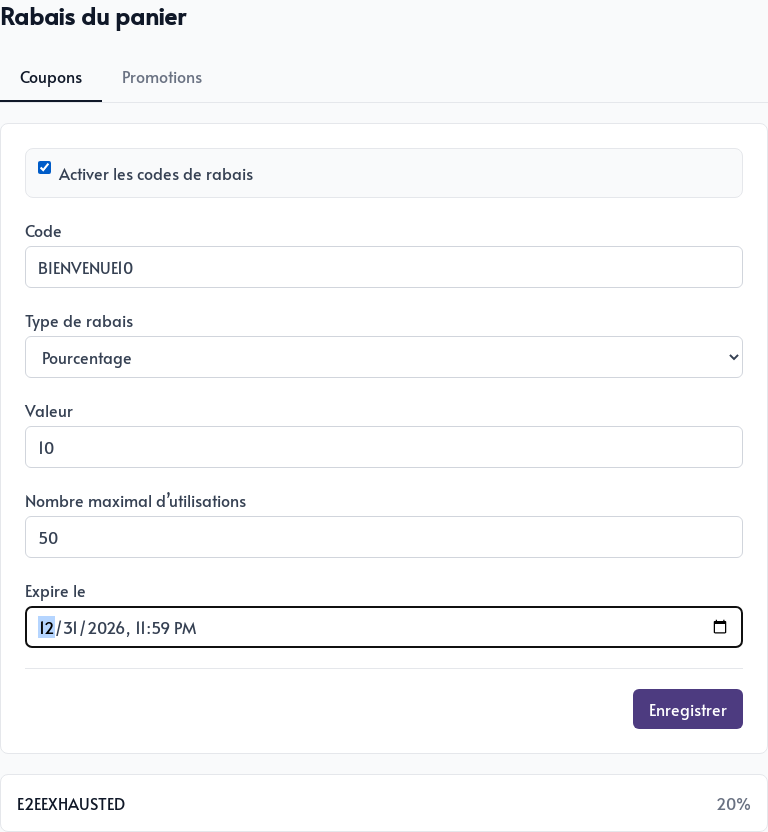
To create a coupon, indicate:
- Code: the text customers enter in their cart, such as
WELCOME10. - Discount type: a percentage or fixed amount.
- Value: the discount being offered.
- Maximum number of uses: the total number of times the code can be accepted. Enter
0for no limit. - Expires on: the date and time after which the code is no longer valid.
Click Save. The code appears below the form, and customers can apply it before proceeding to payment.
A simple coupon is ideal for an easy-to-communicate campaign. To limit the discount to certain items, require specific cart contents, or apply it automatically, create an advanced promotion instead.