The Billing page at apps.parle.work shows what you pay Parle for your entire account.
This is separate from your Stripe account. Stripe is used to receive payments from your own customers, while this page manages your Parle subscription.
Review your subscription
When your subscription is active, the page displays:
- Its current status;
- The modules and options being billed;
- the amount and date of the next invoice;
- the button to manage your payment method;
- Your previous invoice history.
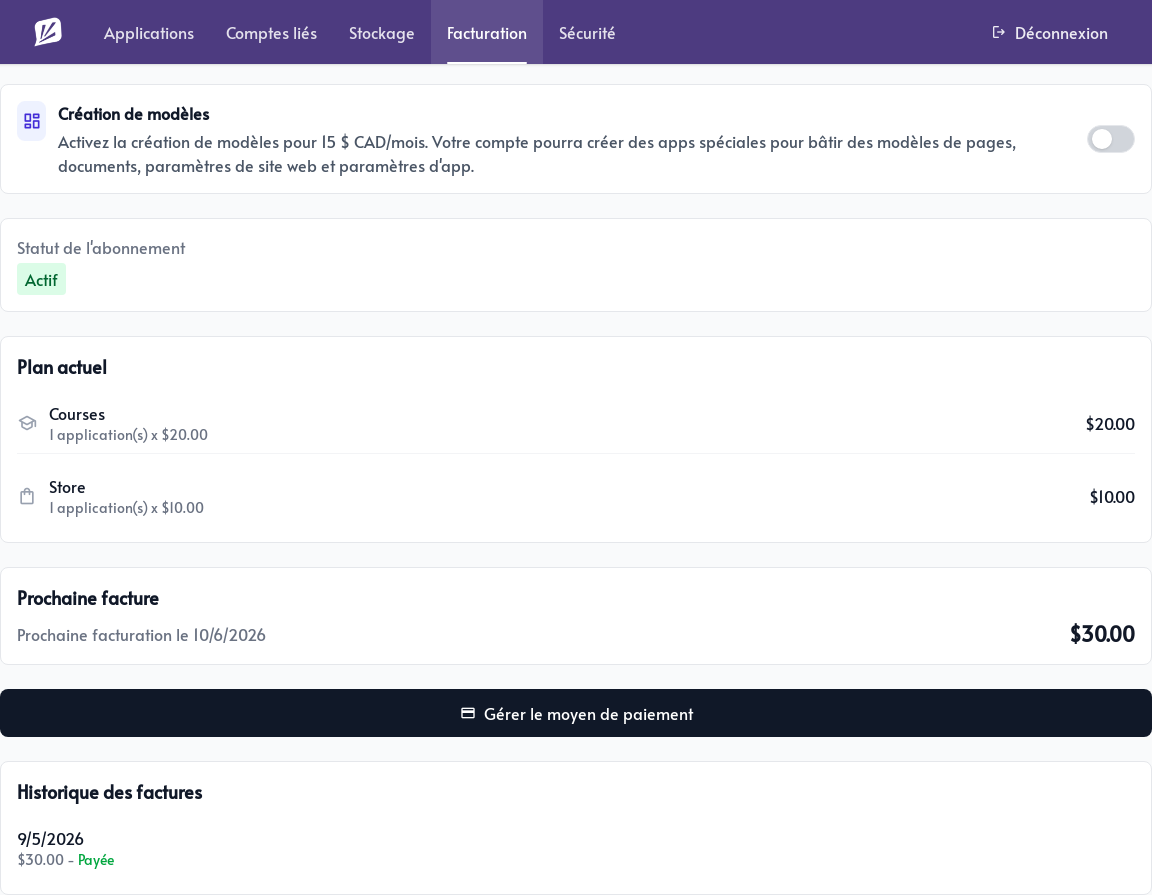
If you do not have an active subscription, click Configure subscription to open the secure payment page. Once you register a payment method, paid modules activated in your applications are added to this subscription.
Your price depends on the active modules across your applications, along with options such as additional storage or phone destinations. Changes made during a billing period may be prorated.
Use Manage the payment method to change the card used to pay for Parle. Under Invoice history, you can open or download previous invoices for your records.
Create templates for your clients
The Template designer option is intended for accounts that prepare and distribute Parle templates. It is especially useful for ambassadors, designers, and specialists who create ready-to-install websites or email sequences for their clients.
When enabled, this option costs CA$15 per month and lets you create applications dedicated to templates. You can prepare pages, documents, website settings, and application settings, then produce a template that can be installed in another user’s account.
First enable Template designer under Billing. Then return to Applications, open the Templates tab, and create a template application. The Website and Email modules are activated automatically so you can build the elements you will deliver to your clients.
You do not need this option to use the editor’s built-in templates or your personal content library. Enable it only when you want to create templates that can be installed in other accounts.